
Zone AssistiveTouch PRO2.0.2 - Google Play
You'll be able to see results in few seconds.
Publisher Description
Zone AssistiveTouch, an efficient tool for Android.
This app uses Accessibility services. Requesting Accessibility service is to help the users who cannot conveniently press HOME/BACK/RECENTS key. You need grant this permission to perform HOME/BACK/RECENTS key by Zone AssistiveTouch.
This app uses the Device Administrator permission. You need to grant this permission to use "Lock screen" feature by Zone AssistiveTouch. You need to deactivate Device Administrator when you uninstall the app. But if you does not want to use "Lock screen" feature, you does not need to activate Device Administrator.
Features:
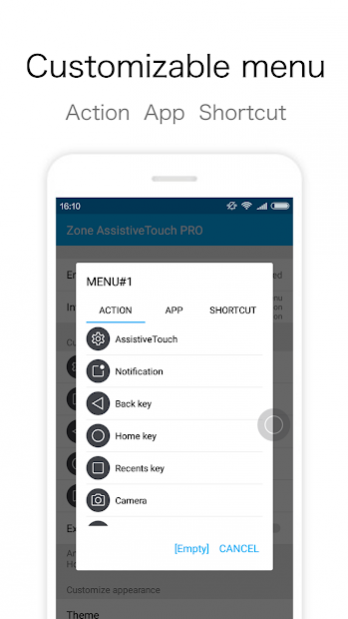
-Customizable menu: quick action or opening application
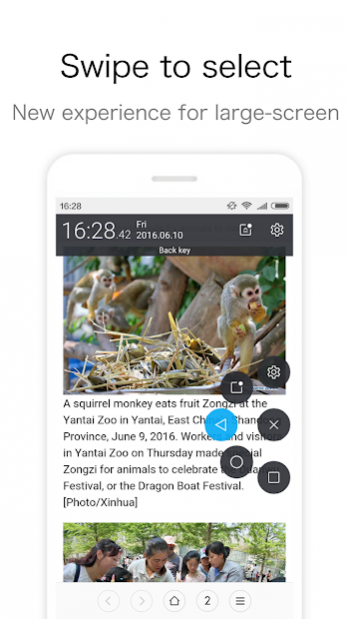
-Swipe circle to select menu: new experience for large-screen phone gesture control
-Become transparent smartly: does not disturb the normal screen display
Quick action:
-Home, Back, Recents key
-Open Notification-panel
-Camera
-Torch
-Lock screen
-Screenshot(Android 5.0+)
-Power dialog(Android 5.0+)
-Menu key(Root)
-Clean ram
-Kill foreground app
-Force Orientation
-Launch Assistant
-App Freezer
Open application:
-Open previous application
-Any application you favorite
-Shortcuts
PRO:
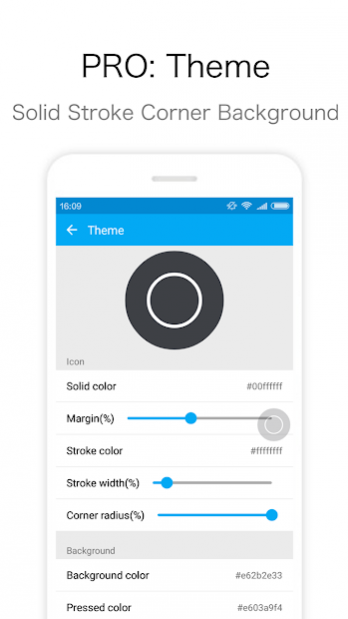
-Theme: sollid, stoke, corner, background
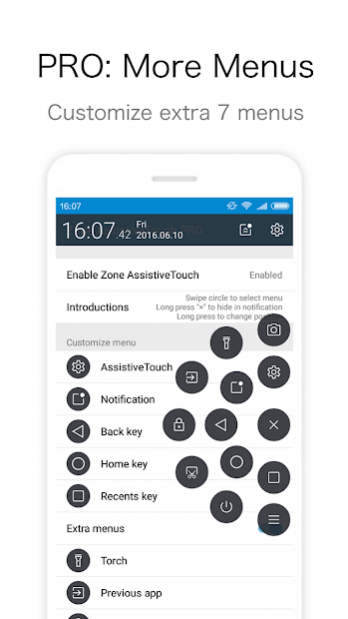
-More menus: customize extra 7 menus
-[Empty] menu
-Functions: clean ram, kill foreground app
-Hide in apps
-App Freezer
-Create shortcuts of functions in Launcher(Torch, Lock, Clean ram)
Feed back
- If you like Zone AssistiveTouch, please give us 5 star
- If you have any problem with the app, please contact us by email
About Zone AssistiveTouch PRO
The company that develops Zone AssistiveTouch PRO is MixiaoxiaoTeam. The latest version released by its developer is 2.0.2.
To install Zone AssistiveTouch PRO on your Android device, just click the green Continue To App button above to start the installation process. The app is listed on our website since 2018-04-08 and was downloaded 0 times. We have already checked if the download link is safe, however for your own protection we recommend that you scan the downloaded app with your antivirus. Your antivirus may detect the Zone AssistiveTouch PRO as malware as malware if the download link to com.mixiaoxiao.touchassistant.pro is broken.
How to install Zone AssistiveTouch PRO on your Android device:
- Click on the Continue To App button on our website. This will redirect you to Google Play.
- Once the Zone AssistiveTouch PRO is shown in the Google Play listing of your Android device, you can start its download and installation. Tap on the Install button located below the search bar and to the right of the app icon.
- A pop-up window with the permissions required by Zone AssistiveTouch PRO will be shown. Click on Accept to continue the process.
- Zone AssistiveTouch PRO will be downloaded onto your device, displaying a progress. Once the download completes, the installation will start and you'll get a notification after the installation is finished.
Program Details
System requirements
Download information
Pricing
Version History
version 2.0.2
posted on 2018-04-08
Support Android 8.
Enjoy.
version 1.9.5
posted on 2017-01-16
1.Support Android 7.1,2.Add "Vibrate" option,3.Add the "CALL_PHONE" permission to avoid the crash of "Direct dial" shortcut,4.If you want to help translate this app in your language, check this project https://github.com/Mixiaoxiao/ZoneAssistiveTouch_TranslationProject. Thanks sincerely.
version 1.9.4
posted on 2016-08-13
1.Support Android 7.0 (Android N),2.New Switch: Long press touch-button to change posstion,3.New Switch: Swipe to select extra menus,4.New Menu: Hide in notification,5.Root functions response quicker,6.Fix the icon size in notification on some Android 4.x device
Disclaimer
Official Google Play Link
We do not host Zone AssistiveTouch PRO on our servers. We did not scan it for viruses, adware, spyware or other type of malware. This app is hosted by Google and passed their terms and conditions to be listed there. We recommend caution when installing it.
The Google Play link for Zone AssistiveTouch PRO is provided to you by apps112.com without any warranties, representations or guarantees of any kind, so access it at your own risk.
If you have questions regarding this particular app contact the publisher directly. For questions about the functionalities of apps112.com contact us.
